How IoT has ushered in a wave of success in Healthcare Services?

How IoT has ushered in a wave of success in Healthcare Services?
IoT in Healthcare
IoT (Internet of Things) is one of those technological marvels of the modern era that has digitally transformed the Healthcare sector by introducing smart healthcare apps. These healthcare IoT applications have helped the medical industry to overcome the existent roadblocks and limitations in its functioning. IoT App Development Companies have empowered the practitioners, patients, and service providers to unfold new horizons. This has resulted in simplified access to medical facilities through remote communication and reduced mortality rate on account of avant-garde treatment methodologies. Needless to say, the rate of adoption of IoT App Solutions has sky-rocketed and an upward demand curve has been observed.
Take a look at this interesting statistical data released by Statistica, indicating the estimated size of the IoT Healthcare market (in billion US $) between 2016 and 2025.
IoT in Healthcare market
Fortune Business Insights predicts that the IoT in Healthcare market size will soar up to USD 176.82 Billion by the end of 2026.
In this blog, I have penned down how IoT in Healthcare has revolutionized the fundamental tenets of this domain and the immense benefits of IoT Application Development reaped by the patients, doctors, and service providers unanimously.

IoT in a nutshell

Internet of Things comprises of a network of devices and software applications, interconnected via computer networks and wireless communication channels. This ingenious eco-system is meant for collecting and sharing real-time data. Data is stored in cloud platforms and can be remotely accessed by authorized users from any part of the globe. IoT in Healthcare has worked wonders in domains like telehealth, mHealth, telemedicine, etc. Let’s dive into some of the use cases in the healthcare domain.

Popular Use cases of IoT in Healthcare

IoT Smart Healthcare Solutions

Remote patient Diagnoses and Observation

IoT empowered solutions record the necessary health parameters to facilitate remote patient diagnoses and monitoring. This is one of the important features of IoT in telemedicine apps.
Doctor-patient consultations take place through live audio and video call, and other advanced communication channels, without the need for patients to pay a visit to the hospital. IoT powered external devices such as digital stethoscopes, oximeters, etc are being used by patients during digital telemedicine consultations.
IoT activity monitoring devices such as heart rate monitoring cuffs, glucometers, pulse meters, etc. used by the patients enable the doctors to remotely observe the health of elderly patients and those with chronic conditions. The data obtained from these devices aid the physicians to identify the correct course of treatment for patients.

Mobile Health and Wellness

IoT mobile app development has elevated wellness to a completely new level. Wearables like Apple watches, Fitbits, etc transmit patient’s vital health parameters through Bluetooth, Wifi, GPRS Networks and display the results in the smartphones. This proves immensely beneficial in keeping a track of the body vitals and other wellness parameters such as sleep patterns, body temperature, heart rate, blood sugar level, activity tracking, etc. and providing real-time data to the patient, their doctors, and caregivers. For example, a Holter monitor device is a wearable that tracks abnormalities in a patient’s heartbeat. This helps in timely preventive care. Click here to gain more insights on wearable technology.

IoT powered ingestible devices

These ingenious ingestible sensors available in the form of pills can be swallowed and it remains inside the human body and stay at a particular spot and sends data to mobile applications. The sensors embedded inside these pills detect drug doses taken and missed by the patient. Some of these pills have an in-built camera that provides visibility of the internal organs. Thus, ingestible devices prevent life-threatening conditions.

Emergency handling

IoT facilitates the accurate collection of patient data in case of medical emergencies and transmission of this data in real-time to the Emergency Response medical staff. This allows the ER staff to stay prepared while the patient is being brought to the hospital and no time is wasted after the patient’s arrival.

Aiding surgeries

IoT powered tools and applications provide handy assistance during surgeries and in handling post-surgery care. The IoT sensors accumulate data, transmit it, and analyze the same, resulting in finding out even the tiniest problem, and thereby preventing surgical complications.

Efficient Tracking of Patients, Staff, and Inventory

Smart IoT healthcare solutions contribute in the following ways:  
  • Wireless ID cards for staff and patients enhance security, effectively manage admissions, and simplify staff management.
  • RFID tags are used to track patients such as babies and elderly patients with Alzheimer’s disease and even staff members in case of urgency.
  • IoT integrates with Real-time location systems (RTLS) to manage the assets of healthcare enterprises. It employs BLE (Bluetooth Low Energy) and iBeacon to track supplies in the operating rooms and inventory.

Virtual Monitoring of medical equipment

The contemporary healthcare services require avant-garde software and hardware equipment and their continuous monitoring, to prevent them from system failures and cyber-attacks. IoT powered solutions virtually monitor them and provide alerts to the medical staff if some anomaly is detected.

Managing Pharmacy

Managing the drugs in a hospital and transferring the same safely to storage facilities is a herculean task with chances of errors. Pharmacies managed by IoT application enable faster delivery of medicines and takes care of drug-preservation issues while transfer.

Handling insurance procedures

Insurance companies leverage IoT devices to validate claims and detect fraudulent practices with the help of the data captured by these devices. Such devices also enhance the transparency between insurance providers and customers regarding processes like pricing, underwriting, handling claims, and assessing risks.

Architecting an IoT Environment in healthcare

Steps to be followed by Digital healthcare service providers for the implementation of IoT are as follows:
  • Deploying devices possessing sensors, monitors, actuators, camera systems, actuators, and detectors to accumulate data.
  • Conversion of received data to the digital format and store the same in a data center.
  • Managing and analyzing the medical data with the help of data analytics based on which the correct course of action is decided.

Key Advantages of IoT powered Healthcare IT services

Easy access to healthcare facilities

Remote doctor monitoring and consultation facilities make healthcare and wellness easily accessible to patients with less mobility, the ones residing in remote areas with no hospitals nearby, and the super-busy professionals who hardly find time to visit the clinic. Moreover, the patients have a plethora of options at their disposal while choosing doctors.

Misdiagnosis of diseases

IoT system with the help of computer vision, sensors can collect data from several IoT devices and leverages advanced analytics enabling providers to know the course of the disease and thus avoid the wrong diagnosis of diseases. Faster and error-free diagnoses of diseases, continuous patient monitoring, and proactive treatment methodologies are some of the major gains for patients opting for digital healthcare services.

Lesser negligence and better adherence to treatment plans

Thanks to the IoT healthcare monitoring solutions encourage patients to stick to their treatment procedures and help the doctors to stay informed about the patient’s condition without much ado.

Operational Flexibility

Online diagnoses with the help of IoT Mobile apps allows doctors to enjoy flexible schedules without having to visit the clinic in case of non-emergencies.

Lesser crowd in hospital spaces

Digitally smart healthcare centers can do away with over-crowded waiting rooms, and as such can manage with lesser spaces and fewer administrative staff. Furthermore, the chances of healthcare staff getting infected with contagious diseases lessen.

Cost-efficiency

  • IoT healthcare solutions enable doctors to scale up the patient count by diagnosing more patients in a day.
  • On account of digital real-time consultation and monitoring, patients save on the cost by avoiding unnecessary hospital visits, longer hospital stays, and readmissions.

Augments Brand value

Implementing IoT powered smart solutions and motivating the patients to adopt these technologies enhances the brand value of a company and provides them a competitive edge over others and improves overall patient satisfaction too.

Final Verdict

IoT in Healthcare has redefined healthcare services altogether by opening up a wide range of convenient options for patients, practitioners, and healthcare service providers. It’s high time that the healthcare operators incorporate IoT healthcare solutions in their practice operations if they would like to make a mark in today’s dynamic and competitive market.
With this, we come to the end of this write-up. We hope this blog was helpful. Do comment and let us know your thoughts.

Smart Strategies for Monetizing your Telemedicine App!
Smart Strategies for Monetizing your Telemedicine App!
Telemedicine app development company
Telemedicine app development has gained momentum over the last decade owing to several reasons. Young entrepreneurs and even giant companies are looking at this as an opportunity and are developing high-end telemedicine applications for healthcare organizations.
However, developing an exceptional telehealth app is not enough; you also need to monetize your app. And, one of the trickiest jobs for entrepreneurs or a telemedicine app development company is selecting the right monetizing model or strategy that would boost their ROI. In this article, we are going to give you insights on trending app monetization models and strategies that will prove beneficial to telemedicine app owners.

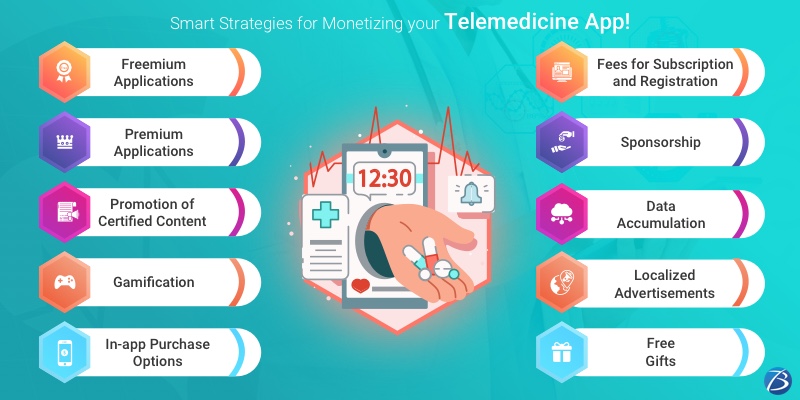
Trending Monetizing Strategies for Telemedicine Apps
Telemedicine/telehealth app

Freemium Applications

This category comprises a combination of free and premium apps – offering two versions of the same app. The free version usually provides access to the basic features, while the premium or paid version comes with additional offerings like advanced features.
The key objective behind this model is to encourage users to download the app for free initially and learn about its usability. Once the app succeeds in engaging the users and fulfilling their needs; the free users will most likely get converted into paid users for accessing enhanced features. This enables the users to get information on what kind of services they are paying for. Moreover, positive feedback by users adds value to your app.

Premium Applications

This model involves charging users for downloading apps and is an ideal option for niche apps with a narrow target audience. Just create a merchant account in the Google Play Store or the App Store and then set the price for downloads. However, this kind of model may limit the monetization potential of your app.

Promotion of Certified Content

This monetization strategy is applicable for apps that provide peer-to-peer services, and that sell certified content that is vital for the practice of care providers instead of selling features. Take a look at this example. In telehealth apps, a fixed amount of free content is displayed for doctors. But, for gaining access to comprehensive content that is periodically updated, practitioners need to sign up and pay a recurring amount as a subscription.

Gamification

Introducing gaming into a telemedicine app enhances the app’s user-friendliness. This is so because the games are designed playfully as per the app’s basic idea and the users participating in these games have to achieve some levels based on the story created by the telemedicine app developers. The offerings through gaming include reminders about daily exercises, medicines, and doctor visits, and even provide fitness status after weeks of medication intake or exercising. Besides these, several innovative strategies like discounts, free prizes, or advice by practitioners can be also included. Thus, integrating gamification in a telemedicine app development solution enables users to set goals concerning fitness or healthcare as well as track their progress, thereby enhancing user engagement.

In-app Purchase Options

This is one of the commonest monetizing strategies for free applications. In telehealth apps, in-app purchases include refilling prescriptions, buying supplements, arranging for pre-pay doctor visits, etc. As such, this approach not only proves profitable for app owners but also benefits users. But remember that your app should function even if the users do not opt for additional purchases.

Fees for Subscription and Registration

Free healthcare applications that serve as effective platforms connecting patients to physicians can charge a registration fee from practitioners who use the app for filling in their free time slots. Moreover, you can establish a subscription monetization model which enables users to select the subscription plan based on their requirements and pay a fixed monthly/yearly/quarterly charge for app usage.

Sponsorship

This strategy refers to integrating sponsorship in your application. It includes embedding the sponsors’ logo within the application in the form of a pop-up or an icon on the splash screen or the footer. It may even include providing special offers or promoting the sponsors’ posts. Telemedicine app owners can rope in influential sponsors from the healthcare domain itself and establish a kind of barter system where they offer products, services, discounts, etc. based on the business domain. This approach proves highly profitable in the medical sector as it not only arouses users’ interest in the healthcare app but also enables app owners to accumulate crucial and valuable data.

Data Accumulation

Big data and AI are trending these days. Big data in the healthcare domain refers to all data concerning the patients’ health and is a valuable asset for several pharmaceutical firms, medical enterprises, fitness training centers, insurance agencies, etc. for effectively running their businesses. And, the healthcare app owners profit by selling this data to the interested parties. For instance, an app tracking the lifestyle of patients who were obese earlier and had gastric bypass surgery can sell the accumulated data to pharmaceutical/insurance companies, or fitness experts. Furthermore, this data serves as important statistics for usage in medical journals, reports, and magazines, and for assessing the advancement of the medical industry.

Localized Advertisements

The advertisements in telemedicine apps must be relevant to user interests, or else the UX may get hampered badly. Certain mobile advertising partners employ beacons, GPS, and Wi-Fi to localize advertising to allow mobile ads that target customers in real-time. These ads allow the apps to connect to the users on the spot. For example, users within close vicinity of a pharmacy store with a beacon may get a notification on their smartphone device informing them about the availability of a medication coupon or any other such healthcare-related stuff. However, users should be provided the flexibility to choose the brands from which they wish to receive notifications. This will not only increase the users’ interaction with ads but also enhance the value of the ad spaces, thereby attracting more brand partners.

Free Gifts

The words “Free services/products” are never missed by any user whereas complex or costly stuff is likely to be overlooked by most. So, free services are a smart way to attract new customers and motivate existing customers to use the app more often. They include:
  • Providing free weight/calorie calculators to daily users
  • Free consultation, advice, and tips for minimizing the risk of getting infected by various diseases
  • Offering a free medicine kit comprising personalized medicines for a week to daily users who strictly adhere to their fitness/healthcare regime.

Conclusion:

It is important for healthcare app owners to pick a suitable monetizing strategy. It is advisable to choose a combination of monetization models for maximizing adoption and optimizing profitability. But, if you are not technical enough or require a customized telemedicine solution, seeking assistance from an experienced Telemedicine app development company will prove beneficial.