Comprehensive Guide on Developing an Outstanding Telemedicine App!

“The global telemedicine market was valued to be 40 Billion USD in the year 2019. By the year 2026, it is expected to grow exponentially and cross 175 Billion USD”
These statistics forecasted by Statista, a renowned market research and statistics portal, indicate the soaring scope of the telemedicine apps and similar other healthcare IT services. The transformations that these digital advancements have brought in the healthcare domain are revolutionary. Especially in today’s unprecedented times of COVID-19 pandemic and lockdown situations, these solutions are all the more in demand. No wonder why several hospitals, healthcare providers, and even individual practitioners are looking forward to developing customized telemedicine apps and software solutions
If you too are here for a comprehensive knowledge of telemedicine app development like a doctor-on-demand app, this blog is for you. We have outlined the vital details required in the development process. Let’s delve into details.
What is a Telemedicine App?
Telemedicine apps, also known as telehealth apps are the tools used for the delivery of healthcare services by the providers to the patients, usually from remote locations. These healthcare apps use new-age technologies to ensure relentless communication between both parties and bridge the gap between them. These facilitate the diagnosis, assessment, and treatment of the patients without the need to be physically present at the hospital or clinic. Thus, the telemedicine apps are widely being used for remote medical assistance as people are increasingly drawn towards such advanced technologies to monitor their well-being.
Healthcare organizations or individual care providers deliver various services to the patients. Based on the services, these apps can be categorized as
- Apps to find general physicians or specialized doctors and book appointments like doctor-on-demand.
- Interactive apps to communicate via phone calls, video calls, etc. with care providers or physicians for consultation.
- Smartphone-based apps to exchange health records, prescriptions, etc.
- IoT-based apps using wearable devices or other medical devices for remote monitoring of health conditions like sugar levels, heart rate, blood pressure, etc.
Top-notch Advantages of Telemedicine App Development
Patients get instant access to all kinds of healthcare specialists without the need to travel to their clinics or hospitals as they can consult the doctor through the app itself using video/audio calls and one to one chats. Minor health issues like fever or cold can be addressed immediately using video calls and also patients can get ePrescriptions through the app. All the records are saved digitally and there isn’t the need to maintain the paper records. These apps provide them authorized permission to text the doctor and enable healthier conversations. They can easily and conveniently access these apps from any device sitting at the very comfort of their homes. It lowers the cost of traveling and saves efforts, thereby ensuring better satisfaction.
Advantages for Care Providers
Using these telemedicine solutions, care providers can simultaneously treat more patients. It enables extensive patient reach. They can remotely monitor the discharged patients’ health. These apps offer them the freedom to better manage their work leading to fewer missed appointments or cancellations. Also, these apps enhance the collaboration with colleagues on patient cases. Saved medical documents, integration with EHRs or EMRs, etc. help the doctors to monitor the patients efficiently, ensure better patient engagement, and improve decision-making.
Significant Steps to Create a Telemedicine App
- Research about the target patients, competitors, best telemedicine apps in the market. Collect and analyze the data to plan the project with attention to detail.
- Decide whether you want to develop an MVP or a fully-functional app and decide the features accordingly.
- Choose the right platform, whether Android, iOS, or both and web applications according to your end-goals, target demography, budget constraints, etc.
- Brainstorm on the right technology stack for backend development, frontend development, database, cloud environment, payment gateways, etc.
- Choose between Custom build and SAAS (Software as a service). SAAS does not allow much customization whereas custom build can be personalized both look-wise and functionally.
- Design the app for a captivating look and feel considering the factors like user experience, user interface design, etc. since aesthetics hold monumental importance.
- Choose rich telemedicine API that allows integrating real-time communication like WebRTC, OpenTok, Twilio, Acuity, etc.
- Ensure top-grade security and HIPAA Compliance for protection and privacy of sensitive medical data and personal information.
- Once developed, test the app rigorously for final quality assurance. Make sure it works flawlessly and as planned.
- Deploy the app live into the app stores for the target customers to download and start using it.
- Ensure timely maintenance and upgrading of the app as per the latest trends and requirements of the patients, as they are crucial to provide better services.
Set of Crucial Features to be Incorporated
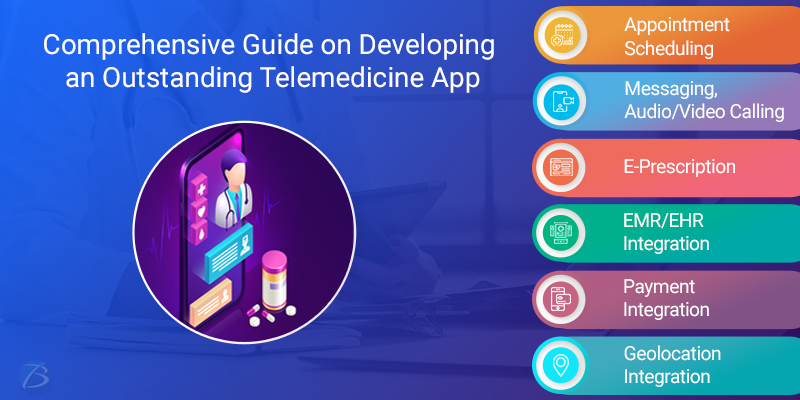
For architecting a successful telemedicine app, it is crucial to have at least the basic features in the app. So whether you decide to go with an MVP model or want a fully functional app with advanced features, we have listed important features accordingly.
Feature Set for an MVP Model
- Appointment scheduling option for booking appointments, rescheduling, cancellations, etc.
- Detailed profile creation
- Communication facility through In-app chatting, audio/video calling, etc. for on-the-spot consultation with patients
- Geolocation integration for knowledge of the address of the respective doctor, clinic or hospital
- Multiple payment gateways for safe and secure transactions
- Backend database i.e. cloud storage for recording communications, storing medical records, etc.
Advanced Feature Set for a Full-fledged App
- Reviews and rating option for patients
- Group chatting and calling functionality for doctors to collaborate with his colleagues and the patient.
- E-Prescription module for enabling patients/doctors to access prescription of medicines and drugs remotely
- Integration with EMR for instantly accessing accurate patient health data for better diagnosis
- Ability to integrate with EHR using wearable devices, IoT devices, and health kits like Apple’s Healthkit and Google’s Googlefit to fetch health data and thereby get a better understanding of the patient’s condition.
- A separate module for medical assistants to update notes, health data, etc.
- Chatbots as a helpdesk alternative
Key Challenges Faced
While building telemedicine applications, you may face several challenges like language barriers where patients cannot communicate their health conditions correctly. Also, there could be other challenges in making the apps HIPAA complaint, implementation of UI/UX, backend integration, etc. The development team may even face some challenges while considering the scalability of the apps.
To mitigate the above challenges, businesses should consult healthcare app development companies for developing robust, secure and scalable telehealth apps.
Are You Interested in Building a Top-Class Website or Mobile App?
Final Words:
For a decade or so, telemedicine app development has gained traction and has turned out to be a lucrative investment for healthcare companies and other hospital bodies. It not only ensures better hospital management, but also contributes to enriching patient experience. It also offers a competitive edge over other top players in the market.
With this, we come to the end of this article. We hope this blog was helpful. Do comment and let us know your thoughts.
For any other queries, mail us at sales.enquiry@biz4solutions.com
!