
Actionable Tips for Top-grade Security in Mobile Apps!

Mobile apps have brought a revolutionary shift in everything around us. It has made a paradigm shift in how businesses and individuals operate in their respective capacities. This has helped to connect with the target audience very easily thereby boosting the profits in a big way. No wonder there is a huge demand for mobile application development worldwide. However, with the development of apps, come security nuances that businesses should not ignore. If the apps are not well-engineered against security threats, they can become an easy target for hackers to do malicious activities. So, companies must ensure that they proactively work on ‘how to build secured apps’ and also follow certain mobile app security standards during the development process.
Do you know what the hackers with malicious intention do?
- Tamper your app’s code and reverse-engineer to create a hoax app containing malware.
- Hack customer data and use for fraud or identity theft
- Induce malware in the apps to access data, grab passcodes for screens, store keystrokes, etc.
- Steal sensitive data, intellectual property, business assets, etc.
- Access your IP and launch harmful attacks
Would you ever want something like this happening to your app? Never! So, mobile app security cannot be taken for granted. Yet, it is quite shocking that over 75% of the mobile apps fail to meet the basic security standards.
This blog outlines some of the crucial mobile app security measures that every mobile application development company must employ while they architecture their apps. Before we delve deeper, let us quickly glance at some common security lapses that could occur while architecting secured mobile apps.
Notable Security Lapses in the Mobile Application Development Process
- Not checking the cache appropriately and not using a cache cleaning cycle
- Not doing thorough testing of the app
- Applying weak encryption algorithms or no algorithms at all
- Utilizing an unreliable data storage system
- Neglecting the Binary protection
- Picking up a code written by hackers by mistake
- Neglecting the transport layer security
- Not ensuring the server-side security
Mobile App Security Best Practices
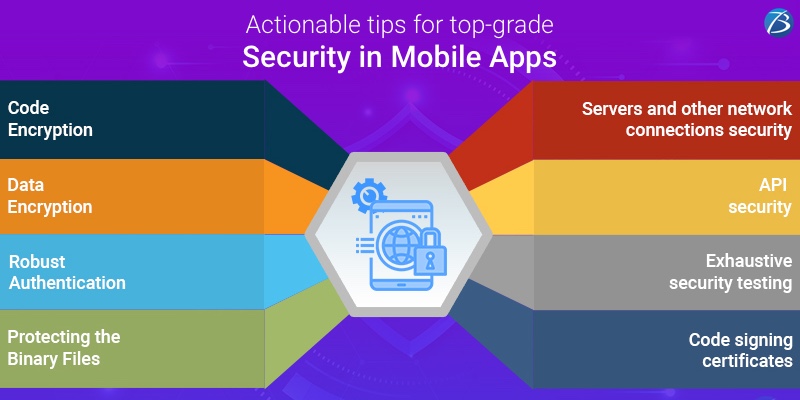
Here are a few common security tips that are endorsed by various industry experts. These are applicable to both Android and iOS apps; however, some additional tips and guidelines are available for both platforms, which we will cover in another blog. That simply means, after applying the below practices, one can also implement best security practices for iOS app and Android app meant for respective platforms. For now, let’s get started with the common security measures for mobile apps.
App-code Encryption:
Encryption of the code and testing it for vulnerabilities is one of the most fundamental and crucial steps in the app development process. Before launching the app, mobile app developers protect the app code with encryption and practices like obfuscation and minification. Also, it is necessary to code securely for the detection of jailbreaks, checksum controls, debugger detection control, etc.
Data Encryption:
Along with the code encryption, it is essential to encrypt all the vital data that is exchanged over the apps. In the case of data theft, hackers shouldn’t be able to access and harm the data without the security key. So, key management must be a priority. File-level encryption secures the data in the files. The encryption of mobile databases is equally important. Also, various data encryption algorithms can be used like Advanced Encryption Standard (AES), Triple data integration standard, RSA technique, etc.
Robust Authentication:
If the authentication is weak, severe data breaches can take place. Hence, it is imperative to ensure a powerful authentication in the apps. Make sure that your app only allows strong passwords. Utilizing two-factor authentication is a good practice. Also, biometric authentications like a fingerprint, retina scan, etc. are widely being used these days in mobile apps to assure high security.
Protecting the Binary Files:
Negligence towards binary protection gives a free-hand to hackers for injecting malware in apps. It can even cause severe data thefts and lead to monetary losses ultimately. Therefore, binary hardening procedures must be utilized to ensure the protection of binary files against any threats. Several hardening techniques like Buffer overflow protection or Binary Stirring can be applied in this scenario.
Servers’ and other Network Connections’ Security:
The security of servers and network connections is an integral part of mobile app security as these are a leading target of hackers. To keep them secure, it is advisable to use an HTTPS connection. Also, the APIs must be thoroughly verified to shun from the spying of data that is transferred from the client to servers. Another security measure is to scan the app with the use of automated scanners frequently. Also, enhanced security can be ensured with encrypted connections or VPN i.e. a virtual private network.
API Security:
Since mobile application development hinges so much with the APIs, protecting them from threats is not an option but a necessity. APIs are the channels for the flow of data, functionality, content, etc. between the cloud, apps, and users. Vital security measures like authorization, authentication, and identification help in the creation of a secure and robust API. To enhance the app security, an API gateway can be integrated. Moreover, for secure communication between APIs, mobile app developers can use various authentications like OAuth and OAuth2.
Exhaustive Testing and Updating the Apps:
To speed up the time-to-market, testing usually falls to the sideways. But this step helps to avoid any anticipated security loopholes in the apps. So, before launching the apps and even after their launch, rigorous security testing must be conducted. Thus, potential security threats can be identified and resolved proactively. Also, updating the apps from time-to-time will help to eliminate the security bugs apart from other issues that arise in the apps after it is out in the market.
Code Signing Certificates:
Code signing certificates help in enhancing mobile code security. In this process, the certificate authority needs to digitally sign the scripts and executables. These certificates help in authenticating the author and assure that the code won’t be edited or tampered by anyone else. A Code Signing Certificate is a must for every publisher or mobile app developer.
Are You Interested in Building a Top-Class Website or Mobile App?
Final Verdict:
Thousands of mobile apps arrive in the market daily, but if, they aren’t protected well, they can pose a threat to the entire ecosystem. Needless to say, hackers and fraudsters are lurking around to steal important data and destroy app security. On the contrary, a well-secured mobile app can prove to be highly efficient, reliable, and profitable for the business as well as the end-users.
So we can conclude that mobile app security holds the utmost importance in the whole process. A smart strategy along with the guidelines mentioned in this blog can help you build a powerful impeccable app with high-level security.
We hope this blog was helpful to you!
Do you have any other mobile app security measures to add to the above list?
Please comment and let us know your thoughts.

