Incredible Healthcare App Development Ideas to consider in 2021!

Incredible Healthcare App Development Ideas to consider in 2021!

Healthcare App Developers
The Healthcare app industry is ever-evolving owing to a sky-high demand for unique apps that elevate the convenience quotient of users and the competitive healthcare app development market that keeps coming up with fresh novel ideas each year. Therefore, healthcare providers need to think about some workable, futuristic, and highly efficient healthcare app ideas to make their solutions popular amongst consumers.
Here are some highly sought-after healthcare app development ideas that will be apt for 2021! Check them out!

Handy Healthcare App Development Ideas
Healthcare App Development Company
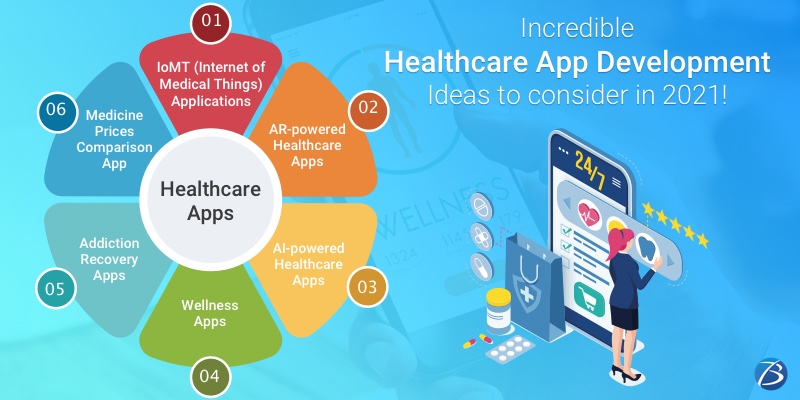
IoMT (Internet of Medical Things) Applications
IoMT is a host of medical devices, tools, and applications that employ networking technologies including IoT (Internet of Things) for establishing a link with medical IT systems using online computer networks. As such, medical professionals can connect and monitor healthcare devices through the Internet. Sensors are used for gathering patient vitals which are then sent to the IoT apps via the internet. Thereafter, this information flows to the medical experts/staff and a response is sent back to those patients. Such apps link patients to their doctors by transferring healthcare data via a secured network and as such play a crucial role in reducing the pressure on the healthcare system as well as the number of hospital visits for patients.
Use Cases of IoMT Apps
  • Remote patient monitoring of patients suffering from chronic/long-term medical conditions
  • Tracking of the location of the patients admitted in medical facilities, medication orders,
  • Tracking the wearable mHealth devices used by patients and send the collected information to the concerned caregivers.
  • Infusion pumps connecting to analytics dashboards
  • Hospital beds equipped with sensors for measuring the vital signs of patients
AR-powered Healthcare Apps
Thermal Imaging App
These AR-infused apps contain a medical thermal imaging camera that produces a thermal image indicating the varying amounts of heat energy that a human body emits. Whenever an anomaly is noticed like a rise in the standard temperature, the app alerts the operators, thermographers, or doctors. Moreover, this thermal imaging camera is employed for monitoring a specific portion of the human body usually for detecting diseases, injury, blood circulation disorders, or high temperatures that cause inflammation. Besides, healthcare facilities, thermal imaging apps can be also put to use in public transit hubs, airports, public roadways, retail stores, offices, etc.
Medical Diagnoses App
An AR-powered medical diagnoses app allows patients to convey their symptoms more precisely to their practitioners or the concerned healthcare professionals. Such an application can also be connected to an AR-enabled handheld scanner for assisting nurses in locating the veins of a patient effortlessly.
AI-powered Healthcare Apps
Medical Training App
Such an app eliminates the need to use an actual human body while training healthcare professionals on performing surgeries.
Drug Manufacturing/Discovery App
The manufacturing of pharmaceutical drugs has always been an expensive as well as a time-intensive process. However, the usage of AI-based algorithms has made it possible to execute years-long processes in just a couple of months. Shorter development cycles and a lesser need for the compounds to be used for lab-testing have helped the pharmaceutical firms to resolve the two major challenges they have been facing since long – time-consuming manufacturing and huge expenses involved.
In the near future, AI-infused applications are expected to play a crucial role in medicine discovery as well. This is because the employment of Artificial Intelligence eases out, speeds up, and enhances the processes of pattern recognition, target selection/validation, compound screening /lead optimization, pre-clinical studies, clinical trials, etc. Such healthcare app ideas promise a bright prospect for app owners.
Personal Training App
This app category is quite popular amongst the masses as such apps enable users to access the benefits of gyms as well as personal trainers using their mobile handsets. Employing AI, an app can design fitness and workout sessions without the need for human intervention or interaction. After being digested/passed via several algorithms and paired with anonymized data gathered from individuals across the globe, AI is capable of optimizing regimens concerning nutrition, exercise, fitness, etc. for users as per their personal goals. In fact, personal fitness routines have become more precise with the passage of time owing to ML/AI algorithms.
Wellness Apps
Diet planning Apps
Such apps organize eating regimes as per the wellness objectives and the current bodily requirements of users. Consumers have to just choose their diet type – vegan or non-vegan – and mention their preferences to the app for receiving the diet arrangement. Some of these apps even provide a suggestion as to which nutritionists the user should consult.
Emotional Wellness/Mental Health App
The stress-prone and fast lifestyle of modern-day individuals drive the need for an app that addresses issues pertaining to emotional well-being. Emotional wellness apps prove highly beneficial in fighting depression, anxiety, PTSD, and other mental health woes.
Such an app can even provide the facility of mental health tracking for lonely individuals, elderly people, etc. Usually, chatbots are employed for playing the role of mindfulness coaches, anxiety helpers, mood trackers, and mood-boosting buddies. Some apps use music therapy for uplifting emotional well-being.
Self-testing Apps
Such an application enables users to keep a watch on their body vitals without the help of any external medical consultant/agency. Consumers can conduct certain medical tests at home leveraging the power of robust sensors contained within smartphones. This allows users to regularly monitor their health and act based on the results generated. Such an arrangement not only saves time and expenses but also saves the effort to visit a lab or medical facility for conducting tests. Body vitals like blood sugar, blood pressure, heart/pulse rate, etc. can be monitored through such applications.
Weight Management Apps
Weight management apps come with outstanding features like wearable devices connectivity, calorie/water intake tracker, BMI calculator, customized diet plan from dieticians, workout guidance, interaction with fitness experts through video conferencing, etc.
Addiction Recovery Apps
These apps offer practical help to individuals struggling to get rid of cigarette/alcohol/drug addiction. The users can sign up using nicknames instead of their real names to protect their privacy. The users are provided with a host of meaningful material such as inspirational videos for ditching abusive products, content containing information regarding the health issues caused by various psychotropic and psychoactive drugs, nicotine, alcohol, etc., and information indicating their long-term impact on the health/social life of the addict. The users can also directly connect with experts like psychologists, medical professionals, etc.
Medicine Prices Comparison App
Modern customers are often baffled and perturbed by the fact that the prices of medicines greatly differ based on the pharmacy. So, there are apps that assist customers to compare the prices offered by various pharmacies/sites before making a purchase and enable them to hit the best deal. The real-time drug prices from different providers are consolidated at one single platform to guide the customers for making the correct decision and saving money.
Besides, such a platform can be converted into an eCommerce portal that sells and delivers medication at affordable rates.

Final Words:

Aren’t these incredible ideas for healthcare mobile app development? Well, if you are on the lookout for well-experienced and highly proficient healthcare app developers for crafting an amazing medical app with distinct and attractive functionalities, contact Biz4Solutions, a prominent healthcare app development company.


Trello vs Jira: Which Agile Project Management Tool to Pick?

Trello vs Jira: Which Agile Project Management Tool to Pick?
Agile Project Management Tool
Project Management is a herculean task regardless of whether one is working with a small or a huge team and project managers are likely to encounter pitfalls and roadblocks regarding aspects like communication, decision making, task delegation, etc. The scenario becomes more complex if managers need to oversee remote teams working from offshore locations with different time zones. And, today, it has become a trend to hire offshore teams for executing software development projects as this model cuts down the overall project cost.
However, the aforesaid project management woes can be effectively addressed by following an agile project development methodology. This approach improves visibility, automates workflow, and eases out task distribution. For implementing the agile approach one needs to employ robust project management software tools/solutions that support agile functions. And, amongst the host of agile team management solutions available, Trello and Jira are the most popular names. Both these tools have their unique strengths as well as their share of drawbacks and are suitable for specific purposes.
This post provides handy insights on Trello and Jira and also compares their pros and cons. A quick read will help you decide on which of these agile project management tools is most suitable based on your team management requirements.

Jira and Trello: In a Nutshell

Jira:
This agile project management tool was incepted by the Australian firm Atlassian, in the year 2002. It supports a wide range of project management tasks like tracking issues and bugs, general task creation, agile developmental tasks, etc., and is used as a base by several applications. Jira comes in three different flavors – Jira Core, Jira Service Desk, and Jira Software – and caters to the needs of customers from diverse domains.
Trello:
This agile project management tool was launched in the year 2011, by a subsidiary of Atlassian. This is a powerful, lightweight, and Kanban web-based tool that is used for visualizing data and task flows. It is known for simplifying collaboration within projects. It comes with a board and card system that enables one to separate projects from boards and differentiate each task with cards. Moreover, it offers a user-friendly interface that facilitates tracking down individual assignments and identifying progress.

Trello and Jira: Similarities

The following functionalities are offered by both Trello and Jira:
  • Can manage flexible teams – Scrum and Kanban
  • Provide interfaces that can track the team’s progress for a particular project.
  • Offer Android and iOS apps and possess the capacity to integrate with other services
  • Enable smooth and convenient communication amongst the team members
  • Provide free options for teams that are small-sized and have minimal extensions

Trello and Jira: Differences

Agile Project Management
Now, let’s take a look at the differences between these two team management tools based on the following parameters.
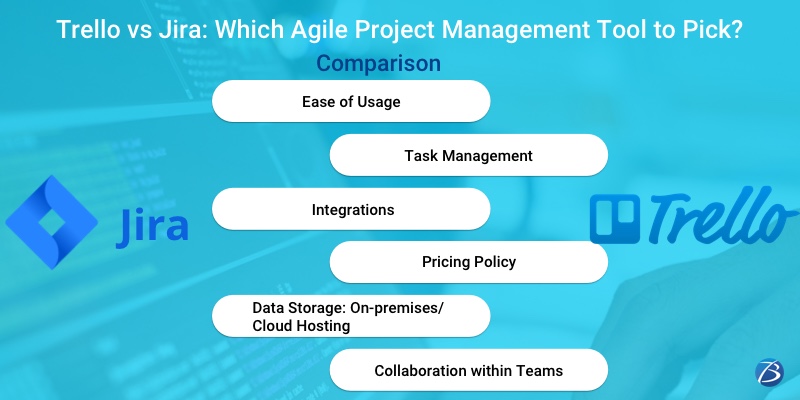
Ease of Usage
Trello employs Kanban-style dashboards. This eases out the process of visualizing the relationship between the various tasks included within a project.
Jira is meant for professional project managers who have to deal with several complexities concerning an app development project. Such complexities usually arise in projects that have incorporated an agile project management approach and hence, encounter many interdependencies between the components of the applications which requires extensive tracking.
Task Management
Trello employs a hierarchy of Boards, Cards, and Lists to manage tasks. These elements can be designed and organized as per your need – add due dates, assign cards to users, attach files, etc. A Trello board resembles a Kanban board. It is divided into columns reflecting various stages in your workflow and contains cards in which crucial information about tasks is stored. As such, this information is readily available to the whole team, thereby making the workflow more transparent and thereby accelerating the team’s productivity. However, Trello lacks pre-built workflows.
Jira’s task management approach is a bit different. It is capable of creating new-fangled workflows that facilitate software development, and also enables building customized workflows. With the workflows created by Jira, one can build a team, analyse, develop and release software, and understand how to customize workflows as well as implement these in other agile scenarios. The management functionalities of Jira provide abundant flexibility while establishing a process and allow building a board for your team. It also enables creating tasks in the form of issues wherein all necessary information can be added and thereafter assigned to specific users by switching the data between columns which mark the stages of the workflow.
Integrations
An ideal project management tool should facilitate smooth data exchange between the platform and various other systems used by your team like helpdesk software, code repository, time tracker, etc.
Trello supports a host of native apps as well as integration libraries. Some of them are FogBugz, Drive, Slack, GitHub, Salesforce, Google Drive, and Zendesk.
Jira outshines Trello by providing a huge library containing innumerable native integrations for various types of actions like time tracking, test management, reporting, cloud storage, CRM, and code analysis. Some of the integrations include Salesforce, Slack, Gantt, Marker.io, Evernote, Bitbucket, OneDrive, Google Drive, Dropbox, etc. Additionally, customers are offered a free developer API for setting up manual integrations.
Pricing Policy
The pricing policy of Trello:
  • Free Plan: It offers up to 10MB storage per file and 10 boards
  • Basic Plan: It offers the core project management features, up to 250 MB of storage per file, and an unlimited number of boards
  • Premium Plan: This plan costs 10$ / month for each user, offers several additional board views including timeline, map, calendar, etc., and provides access to unlimited automation that saves time.
  • Enterprise-level Plan: This enterprise plan costs 17.50$ per month, provides more control over the software, and allows branding on boards, adding custom fields, and grants permissions for attachments.
The pricing policy of Jira:
  • Free tier: It offers only 2GB of storage
  • Standard Plan (7$ / month): It offers 250 GB of storage and access to 10,000 users
  • Premium Tier (14$ / month): Unlimited storage and access to 10,000 users
  • Bespoke Tier (customizable pricing policy): Cost is decided based on the number of modules used and the number of users who require access to the app.
Data Storage: On-premises/Cloud Hosting
As far as data storage is concerned, businesses these days either go for cloud hosting or prefer storing data within the private network of their organization.
Trello is available as a cloud-hosted service. Therefore, it works best for enterprises that do not wish to bear the hassles and invest a great deal of time in maintaining an on-premises system.
Contrarily, Jira users can choose between two options – a cloud-hosted version or an on-premises solution. The monthly cost for both versions is the same. However, the enterprises that opt for on-premises hosting have to incur additional expenses: one-time establishment cost that can go up to 4,500$.
Collaboration within Teams
Using Trello, you can invite unlimited users for sharing a board, and more importantly, all users gain similar visibility concerning the tasks and status of the project. Users are offered various means for communicating – commenting directly on cards, sharing attachments, using emojis, mentioning the names of teammates, etc. Furthermore, the users can be assigned to specific cards, and a notification will be sent to them via SMS, email, or push notifications, depending on their preference.
Jira users enjoy a wide range of collaboration features within boards and issues like instant messaging, file sharing, task assignments for team members, custom notifications, etc. Jira provides more agile features as compared to Trello and so, turn out to be immensely useful for the project managers who prefer organizing their work in sprints. Jira supports Kanban, Scrum as well as mixed methodologies and was specifically designed for serving the agile software development approach.

Trello or Jira: Which tool befits your Team Management Model?

Size of your team
It’s important to consider the size of your team and the possibility of future expansion.
If your organization is huge consisting of various departments, Jira would be your ideal selection. There’s no point in choosing Jira if your team is small and is going to use only a fraction of the features offered.
Trello, on the contrary, works better for organizing tasks for smaller-sized teams. However, if your team is small but is likely to expand in the near future, it may outgrow the capabilities of Trello quite soon.
Project Requirements
Opt for Trello if you require an easy-going solution that can be effortlessly and speedily adopted by your team. Besides, Trello offers more flexibility; but it may be unnecessary if your project involves software development only. However, despite an easy learning curve, it offers limited functionalities.
If your project involves an agile methodology, Jira would be your ideal pick. Despite a difficult learning curve, Jira provides more functionalities. However, since Jira is a typically designed agile project management tool, managing other types of projects using it, will be difficult.
The Complexity of the Project
Opt for Trello to execute simple projects involving small teams that do not need reporting and automation as Trello offers a simple interface and service flexibility that enables one to quickly build a transparent workflow.
Jira is an ideal choice for technically complex projects – multiple-role projects that require reporting and automation. However, configuring Jira and comprehending the workflow is not that easy and time-consuming as well.

Key takeaway

Now, you must be well versed with the distinct capabilities of both Trello and Jira and would be able to comprehend which project management software tool suits your team management model. Remember to identify your objective, define your short-term and long-term goals, and then go ahead to select a team management software tool.
In case of any technical assistance regarding project development/management, reach out to Biz4Solutions, a prominent offshore software development company in India. Our exemplary services are worth a try!